Sunday, August 23, 2026

On Pickleball and Video Recording


For those who may not know, I own a completely private and non-commercial building with 3 pickleball courts in it. I love pickleball and love to play and decided I wanted to have a great place to play at home, so I built it. And along the way I decided I wanted to be able to get video from my courts easily. So I started working on ways to do that, starting with an iPhone mount on the wall, then a GoPro, but ultimately I needed better.


First, a description of the video system. I started by simply adding a camera from my Unifi Protect security NVR setup to a pickleball court. Using that, I could go back and get games. But I quickly realized I didn’t really want games, what I wanted was to be able to mark a timestamp easily to find interesting points…Nasty Nelsons, body bags, or just long fun points or amazing shots. You can go back and see some clips on Instagram by hitting up the @picklebarnes account.


I cooked up an idea in conjunction with my son, Kevin. We figured out how to make the “Action Button” on my Apple Watch drop a timestamp in a Notes file on my iPhone. Worked pretty well for a time, but then two things happened: first, Apple broke it. Like as in some OS update literally broke the ability to make the timestamp appear in a Notes file. But on top of that, I also added a camera to *each* of my three pickleball courts, which was another problem altogether because now I had three places I would have needed to search for my clip since my Timestamp didn’t have a way to know which court.


I could have probably done some Siri magic to do something like “Hey Siri, add the current time and Court number 2 to my Notes file for pickleball clips” and maybe most of the time it would have happened. But I didn’t want to be stopping play to do that. And I hate talking to Siri anyway.


So I came up with a new system. I bought six Flic buttons and the Flic Hub. These are pretty small buttons that each have their own coin battery that should last a couple years and can stick to a surface. I then laser cut and engraved a nice little sign to stick them on that basically says you can push this button if something just happened that you would like a video clip of. And I put one of these on each end of each court. But what actually happens when you press the button?


Nothing as cool as you might expect. All the button press does is drop a court number and a date and timestamp in a Google Sheet. Which is a lot better than nothing! Sadly, at first setup there was no way to also get the seconds in the timestamp, just the current hour:minute.


So how to get the video from that? Well, first I’d take a screenshot of the Google Sheet and crop it to JUST the event as a whole (so anywhere from a couple presses to maybe 30 if it was a big group playing) and save that to my Photos. That serves two purposes…one, it’s an obvious marker in my Photos between events, because I am often grabbing the clips from several different days of events at the same time, and since these are video exports, they go into my Photos as new events, NOT as events that happened when they really happened. That is to say if I go get several days in a row, they all just show up the day I get them as one long stream. So the screen shot between each event makes an obvious break in my Photos roll. The other purpose is an easy to follow list. You see, getting the clips from my NVR is easiest using the iPad app. And to ease my workflow, what I’ll usually do is use my iPhone to view the list and my iPad to grab each clip.


So with my iPhone list in hand, I fire up the Protect app on my iPad, then I have to select the court camera I want to grab clips from. Then I have to select the date to go back in time to the right day. Then I have to scroll to the minute BEFORE my timestamp, because often that’s when the point started that I was after. I usually scrub to about 20s before the minute of my stamp and start watching. Sometimes it’s obvious I’m already in the middle of the point I want, so I go back and start further back. Otherwise I keep watching and mentally noting the start time of each point that happens until I DEFINITELY get to the spot I want (it’s usually obvious from the point itself, but if not then you can also see the person on video go for the button, in which case it’s the point just before that). Then I hit the button to “video archive” and then I have to scrub the start marker to the time I mentally noted, then the end marker to the end of the point. Then click “Download.” Wait for that to finish, then hit the back button to move back to the main timeline, then move to the next time slot on the list and repeat. For each camera in the list (there will usually only be one camera for a foursome, because we almost always pick a court and stay on it…but for groups, there could be presses intermixed on all courts).


So as you can imagine, that’s a lot of clicking in and out to get each clip. A typical foursome probably averages six or seven clips and I’d say that takes me about 15 minutes just to get the clips.


Then I made a conscious choice that it would be fun to share them via Instagram instead of just sending them to everyone involved. That created an entirely new workflow. I’ll be less precise here, but just say this: it was about 2.5 times the amount of time just grabbing the clips took to make the posts *good*. And by “good” I mean the algorithm liked them enough to push to random people. Getting the edit cuts just right plus adding some text that made at least light fun of a person or what was going on got the most exposure always. And at the peak I was getting 1.3M hits per month. Yes, MILLION.


But ultimately that just attracted assholes in the comments and didn’t generate any actual value other than, yes, people could see their clips and their friends could also see them. But at a tremendous time cost to me. As it grew it seemed worth it, but at a certain point it finally wasn’t worth it and I just stopped posting.


Ultimately I did decide to start just texting people involved their clips directly, which has gone fine. And while once I started doing that it seemed like I was “winning” because it took a lot LESS time than before, it also still took significant time and started feeling like a bit of a burden. What I needed was more automation. But let’s back up a bit…


A while back a friend pointed me to SwingVision, which can analyze pickleball matches quite well. The one caveat is that it requires 60 frame-per-second (fps) video. The reason is simple…the pickleball can move pretty fast at times and it needs to be able to see exactly where it bounced. At 30fps the ball simply moves too fast and you can often have the bounce happen completely between frames and so far away that even reasonable extrapolation can’t tell you for sure if it hit the line or was outside the line.


iPhones and GoPros can easily do 60fps (or higher), but introduce a LOT of complexity in trying to use them for this. For one, to get them in the right position requires putting them on a mount high enough that they require a stepladder. And you have to make sure you align it properly and hit start and stop and then gather the video from the device and a whole bunch of nonsense that happens around the playing that’s just, frankly, frustrating on its own. The NVR and built-in cameras is just way better since they are always recording. The problem is that the only “security cameras” that can do this are either hard to find or VERY expensive. Fortunately some sleuthing turned up an Axis camera that’s no longer sold, but is very available used on eBay for around $150 each or less.


I bought one of those and then setup an open source NVR called Frigate to do the recording. At first it looked very promising and I was actually able to get a usable game from it, but at some point things went sideways and it took a few hours of troubleshooting to make the cameras pretty solid at shooting 60fps. Once done, now I basically had a higher quality video system that was no better than the original in how much time it took ME to get the video from it.


But along this time I had started experimenting with Home Assistant, an open source home automation package that’s really great at being the glue for automating all sorts of things. It knows how to talk to things like Frigate, Flic buttons, the Protect security cameras, and much more. So I had Claude help me convert the Flic buttons from simple timestamp-dropping to actually have Frigate just export the last 60s or 120s (single or double-tap the button) before each button press into its exports container, which works great. Frigate has a reasonable web interface for downloading those, which by itself would save me a good bit of time grabbing clips that are “very close.” 


But I wanted even better, so I had Claude write me an app for the iPhone/iPad to manage the Frigate exports. So it will load whatever Frigate has into a nice list with thumbnails and I can download those to the app. Once in the app, I can very easily trim them down to the proper size. If I find that the export didn’t quite get enough footage, it’s very easy to hit a button and download it again with 30s added to it. Then once trimmed to the clip I want, if I find that I really want that same clip from one of the Protect cameras (which are on the other side from the Frigate cameras, as well as the center court having an aerial camera), I can click one button and it goes and grabs the exact same time range from those cameras, too, and imports them to the app.


Once I have all the clips in the app that I want, I can share them directly via the normal iOS “share sheet”, which means generating an email or text message is super easy. And I can also save them all directly to my Photos roll. Bang, workflow taken from 15 minutes to more like 2, if that. It’s entirely possible to ship the videos to the participants before they can change shoes and walk out the door!


And there we have it. Video captured on the Axis Q3517 that was pulled via a single button press, then processed using my iPadOS app completely. It's pretty perfect at this point and makes this process so much easier. I may go back to posting some things on Instagram, even!


I'm baaaaaaack....maybe?

 Quick post. Yeah, it's been like 12 years since I was here. Many reasons why that don't matter, but I've found myself recently wishing I had a good place to publish a few things, so here it is. Gonna give this a try again. 

Thursday, June 19, 2014

My first from-scratch project with my 3D printer

After much research on 3D printers, I settled on the $750 "CTC" one off eBay.  It's a clone of the original Makerbot Replicator, and I suspect it's made by the same factory that originally made the Replicator for Makerbot.  Makerbot has moved on to fancier and more expensive units, but in my research I just couldn't seem to justify the extra cost for the final product.  In fact, I looked at possibly spending at much as $15,000 on a printer, and yet still settled on this $750 unit.

It really seems like you have to step up to $20,000+ printers to do significantly better things than this CTC printer can do.  You would need to be running it constantly, and I'm merely a hobbyist who was looking to learn a few things and perhaps make a few things that could really be used in the real world.

I started out printing a few things I found on Thingiverse.  I'm kind of surprised more people don't just grab things from there and pay to have them printed at sites like Shapeways.  Before I bought my own printer, I did do 3D model of an enclosure I wanted and had Shapeways print it.  The service takes several days including shipping, but it's not terribly expensive and the quality is quite good.  But all it did was whet my appetite to be able to print my own things NOW.  Enter the research and the purchase of the CTC printer.

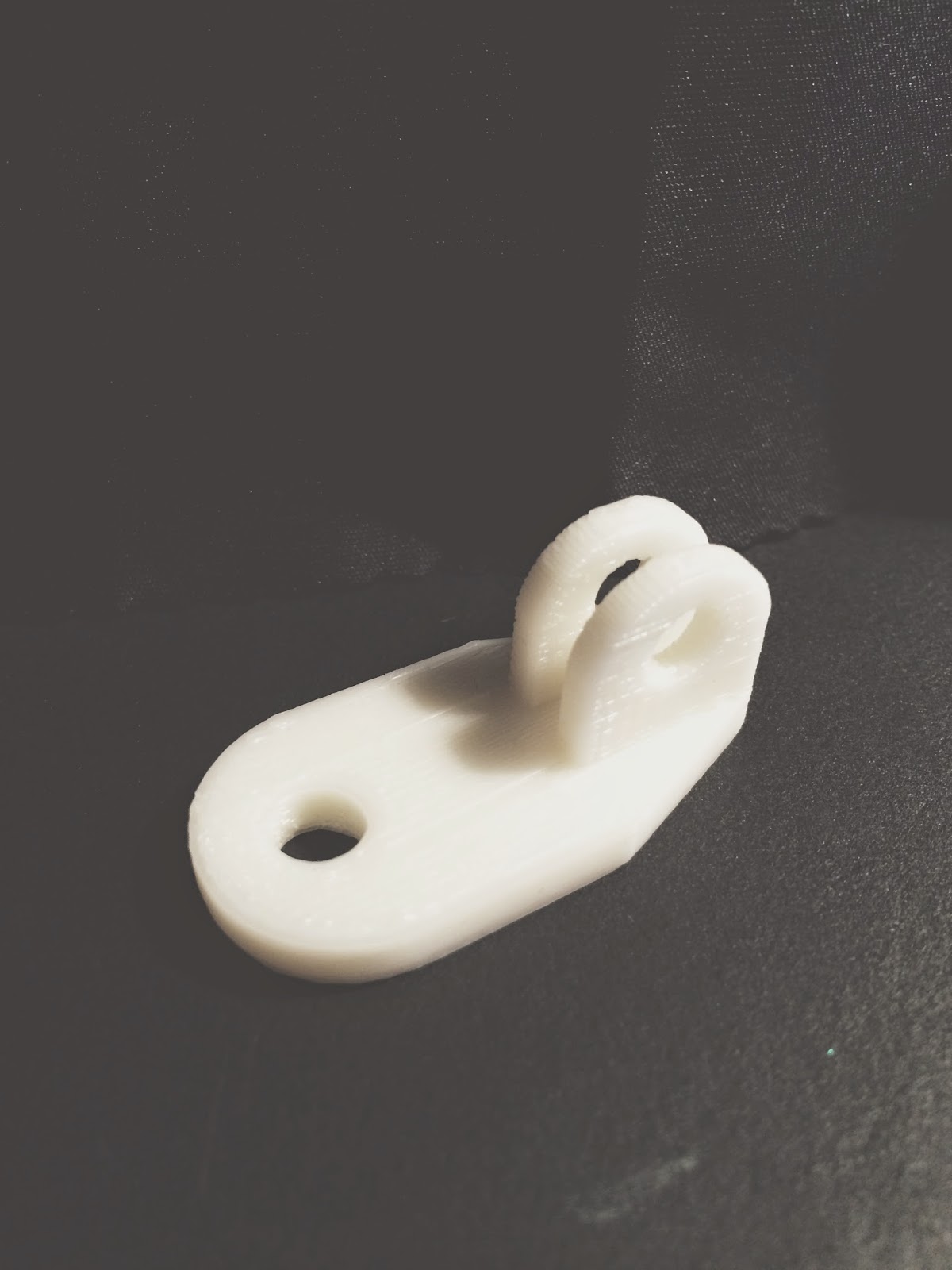
The first few prints included some mediocre iPhone cases as well as a cool little GoPro mount, seen here:


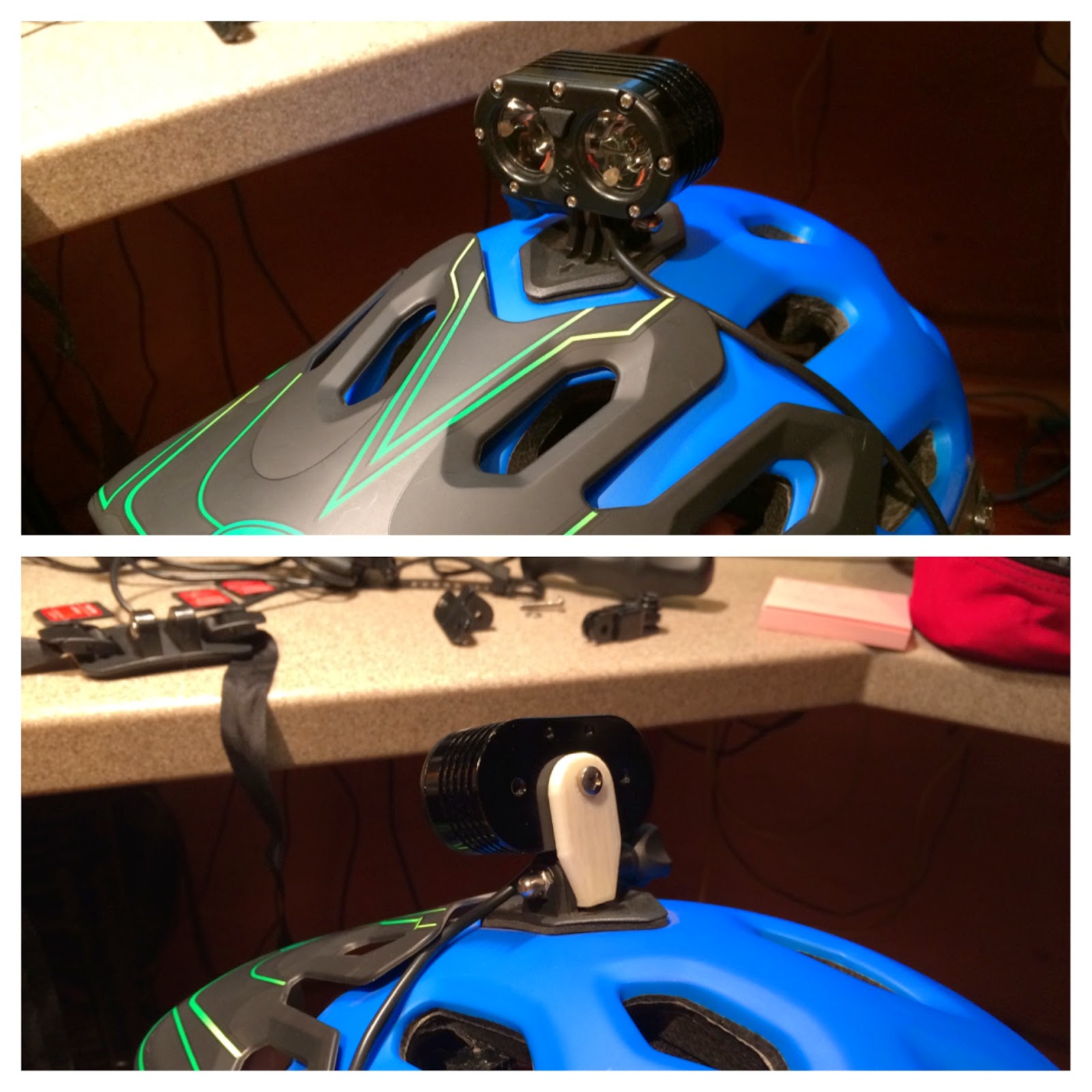
Not the most complex thing, but it actually works pretty well.  Here's one used to adapt my mountain bike headlamp to work on the GoPro mount of my bike helmet:

The material is VERY strong and fairly lightweight, too.  If there's a downside it's that the color palette is a bit limited and the time to print is pretty slow.  This little item takes about 25 minutes just to print, but setup and everything included makes it more like an hour for the first one and about 35 minutes for each one after.
 

 A fun thing to do is add a second video camera on the bow of the boat.  Unfortunately there's no good way to do that on these particular boats (and we've tried several different sit-on-top kayaks for surfing, and these seem to work better than most for a 200 pound adult).  So I set out to make something that would work in place of the grab handle in the front.

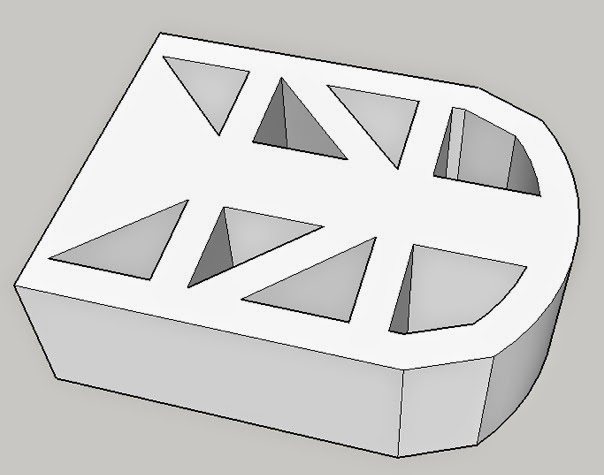
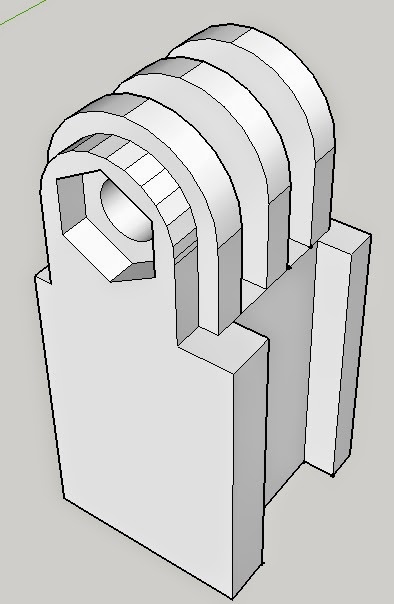
Here are the parts as I designed them in Sketchup:


 And assembled in place with a GoPro on the boat:


Normally the boat would have a small piece of plastic down where the string connects in this photo attached with a short screw.  I removed that and took the handle off that piece and put it on my GoPro mount.  Then I bolted everything through with a long bolt into the original hole.  It seems every bit as strong as before, except now there's a place to put a camera.  I normally use a chest cam for the best action, but a camera pointed back at the rider is a fun view, too.

There will be more almost-interesting things coming from my evil lab, but not until after the beach.

Saturday, May 17, 2014

Dear Garmin, You're Drunk

So today I ran in a place I had never been before, and I was alone.  I was fairly sure I'd have cell service and I figured that if I needed to see a map I'd be a little happier using my phone than a watch, so I started the Strava app to record my run as well as my Garmin Fenix 2.  And I'm glad I did.  First, the Fenix 2 data as seen after uploading to Strava:


The most odd part about this?  I didn't do a loop.  I did an out and back.  Here's the data my phone recorded:


That's much more accurate at 6.7 total miles.  The first one had a bonus .7 miles for a total of 7.4.  Crazy.  The Fenix 2 is currently running the latest firmware from Garmin.  I did get two separate warnings that it lost satellite reception.  But it really shouldn't have as I don't think the phone did.  The phone was being worn on my left bicep and the watch on my left wrist.  Clear day, but I was on the side of a mountain.  No huge cliffs near me, and it was a single lane fire road the entire way, so tree cover wasn't that great.

If anyone from Garmin is reading this and needs the data to examine, you can find it here.


Thursday, April 18, 2013

What's Wrong with College Basketball

The Big East used to be known for more a more "bruising" style of basketball.  The officials let more contact go and the league liked being known for being a little more "nasty."  Still, go back and watch tape of top Big East teams during the 80's, 90's, and even into the early 2000's.  They aren't painful to watch at all.  They did have occasional lower scoring affairs, but in general a Big East team in the NCAA tournament, where it was said to be called more traditionally and thus "tighter", could score in the 80's and 90's, too.

Fast forward to today and everyone is screaming about how low scoring the game has become.  The fix, people seem to think now, is to lower the shot clock.  I do believe that will increase scoring some, but it will still make the game more painful to watch than it is now.  You'll have even more hurried possessions resulting in low percentage shots.  But due to a noticeable increase in possessions, the scores will go up.  A little.

No, the answer is not a shorter shot clock.  24 seconds in the NBA is crazy low, but it works at that level.  35 seconds in college is plenty short enough already.  We used to score in the 80's, 90's, and even into triple digits just fine with a 35 second shot clock.

The answer is call the fouls.  Call every foul as is spelled out in the rulebook already.  Call them on the perimeter.  Call them on the blocks.  Call them in between.  Just call them.  You say "oh, but that'll slow the game down for all the free throws we'll be shooting."  Not for long it won't.  Players want to play, and players will adapt and stop fouling.  Currently it's getting to be a free-for-all where players know the refs aren't going to call much of it at all, so they do things with wild abandon now.

Guys with natural ability dribbling the ball can't turn the corner because the defender is allowed to bump them.  Offenses have adapted some, but all they can do is try more moving screens, which has actually had some success, especially if you use a moving screen in the lane to free a screener heading to the top of the key (see: Louisville in 2012-13).  In general, allowing overly physical play helps the defense way more than the offense.  And hence scoring goes down.  Let the offenses work without all the contact, and I believe scoring will go back up.

The other thing is the charge/block call.  It's here where I do feel for the officials.  It's a hard call to get right.  It always has been.  Here I'd like to see a major change that would make it easier, though.  Change the rule so that the defender has to be set (two feet planted, no significant leaning) when the offensive player picks up his dribble.  Currently the rule is when he leaves his feet, but I think that encourages help defenders to try to simply "get to the spot" before a player leaves his feet.

The point of making it when a player leaves his feet is that he's basically "out of control" at that point since he's going airborne.  I say he's all but out of control once he picks up his dribble because he can only take the two steps, almost always toward the basket at that point, and he's got to get rid of it.

Now, is this an easier call to make?  Not really.  So why do it?  Because there won't be as many charge/block calls to make at all.  It'll be too hard to try to draw a charge intentionally as a defender.  It'll only happen when an offensive player is truly out of control, and those will be obvious.  The rest of the time defenders will go back to trying to block the shot.

What will this do?  It'll let guards who are quick enough to turn a corner on their man have a better chance of finishing, rather than constantly getting scared and pulling it back out.  Again, scoring will go up.  That silly circle they put in place changed almost nothing.  I don't think we saw any fewer attempts by defenders to draw charges, and almost never did we see any inside the circle.  So maybe it did change the way players draw them a little, but not enough to matter, I don't think.

But these two changes alone would restore the scoring in the game and make it more fun to watch.  There's simply too much advantage in contact right now, and that's never been what this game was about.

Saturday, February 16, 2013

Today's Unexpected Joys

As of a few days ago, today's schedule was supposed to go something like this:
  • get up early and run for an hour
  • go to Moncure (about 45 minutes away) to coach Zach's game (and picture day)
  • bolt straight to Kevin's school to coach Kevin's game, eating lunch in the car (and picture day)
  • leave Kevin's game and go to the UNC baseball game (a little late)
  • leave the UNC baseball game and go to Burlington to meet friends for supper
Today's first unexpected joy was snow.  All day.  It was mixed with rain and just a tad too warm to really accumulate (it would for a while, then go away), but snow is cool and sometimes those flakes were huge.


Snow led to the second unexpected joy, and that was the cancellation of Zach and Kevin's basketball games.  See, I don't enjoy coaching.  I really don't care for picture day, in particular, because it takes an hour game and makes it an hour-forty-five affair of aggravation.  On top of that, we only had an hour between games and the game sites were 20+ minutes apart, which meant we'd have to eat in the car and likely be a little late.  So it's like a day off work.

The cancellation of those basketball games led to the third unexpected joy, and that was that I got to go to the UNC versus Virginia basketball game.  Due to the fact that Zach and Kevin's games overlapped that game, I had let my parents use all four seats, and they already had invited Dad's cousin Phil who was bringing a friend (from all the way in West Jefferson!).  But me and the boys decided to go anyway and scalp tickets.  Fortunately I have the Sprinter van, too, so we were able to all still ride together and use the good parking pass.

Having to scalp tickets led to the fourth unexpected joy.  I know this seems unlikely, but it's awesome.  While I've always been willing to use scalpers if I have to, the reality is I hate doing it.  It's a dirty, opportunistic business.  Anyway, I passed on a good set of three tickets at $90 each (face value was $50) and kept looking.  Then a guy approached me and said he had two tickets.  I asked where and how much and he replied they were front row of section 210, which is upstairs but the front row.  210 is also side-court.  So they are very good seats.  And he said we could have them as he was just planning to "look for a Dad" and let him have them.  He and his daughter were using his other two seats.  I said we'd take them and if the boys had to sit without me we could make that work.  So I then bought another seat for face value from a scalper in the upper deck and we headed in.

[ As a sidenote here, I was definitely a beneficiary of the pay-it-forward line of thinking.  Dad and I used to buy tickets from scalpers quite a bit back in the 90's for UNC basketball games, but one day a nice man gave us two tickets provided we were "going to use them."  You see, he had given tickets away before only to watch the guy he gave them to sell them.  So we said absolutely, we weren't scalpers and would go in with him.  Since then, I've always done the same thing when I've had spare tickets before games.  And I never charge my friends or family for tickets.  While I could certainly have afforded to buy tickets today, it was nice having a fellow father help me out. ]

I had hoped that some of the people that sat around my normal seats wouldn't show, as is often the case for games in bad weather.  But today was kind of a big game for UNC and the fans really came out in force.  It was a great crowd.  So before the game we headed up to take the boys to their seats and most of that entire area was empty, including the row of four seats behind them.  So I decided to sit there, especially upon hearing those folks didn't show up pretty often.  And they didn't, which was today's unexpected joy number five.  I did pay face value ($50) for the ticket I used to get in, but I ended up able to sit with my boys in much better seats.

This was the first pitch of the season, yesterday, and it was 60F. Huge contrast to the snow today!
The UNC baseball game was cancelled completely due to the weather, which wasn't an unexpected joy at all.  But I had decided last night that I needed the sleep more than I needed to see the baseball game and planned to run after the kid's basketball games.  But that plan still worked as there was plenty of time after the UNC basketball game.  But it was still snowing and right around 32F.  Cold and wet.  The ground was very wet.  But you know what?  It was a great run.  Running in the snow is an unexpected joy all by itself, so that's unexpected joy number six.  I should note that I considered a treadmill run (which I haven't done in nearly two years), but my coach subtly reminded me that it really wouldn't be that bad.  And it wasn't.

I was worried about exactly what to wear during the run.  I ended up with compression shorts, running shorts over those, a long sleeve Smartwool shirt, a dry fit long sleeve running top, a fleece zip up vest, thin running gloves, an ear covering headband, Smartwool socks, and trail shoes.  So I was bare legged.  And I ended up pretty much perfect...I did need to unzip the fleece vest most of the way, and I contemplated removing the gloves a couple times, but I was basically comfortable.  I was pretty much soaked when I got back, but still warm.  Nothing would have stopped me from being soaked by then even if I had a water barrier on as I would have simply been sweating inside it anyway.  So it was great.

And then there was supper.  Originally we were going out, but Ashley realized she had all the fixings for homemade chilibeans.  That was unexpected joy number seven, as that's better to me than anything we would have eaten out.  Combine that with the comfort potatoes that Alisa made for me in exchange for letting her take an extra half day off to extend her weekend a little, and supper was fantastic.  (And another note here...she didn't have to make me those potatoes.  I really just sort of begged my way into them.  They were appreciated, but she would have gotten that half day off just for being the world's most awesome assistant anyway.  Don't tell her, though.  I'm probably not giving anything away, as she doesn't read my blog.  Or by the time she does, it'll be a month later.  Time heals all compliments, or something like that.)

The view from our seats as Tyler Zeller prepares to have his jersey officially honored.
So that's one day with seven unexpected joys and the only cost was missing the UNC baseball game and missing dinner with the Kimels.  So if we play the plus-minus game, we're still at a solid plus-five for the day.  You simply can't beat that.  Oh, UNC did beat Virginia, but in fairness to my Unexpected-Joy-O-Meter, I really did expect to win that game.  Some would say I shouldn't have, but I did.  And I'm still happy and a little bit relieved that they did, but I can't claim it for the UJOM.  Getting to be there for it was important more than just for the game, though, because I also live for moments like today's half time festivities...you see, they officially honored the hanging of Tyler Zeller's jersey in the rafters.  He was also given the Patterson award before the game, and Lennie Rosenbluth and Tyler Hansbrough were also given special recognition today.  Being there for those things is just as important to me as seeing another win.

Thursday, January 10, 2013

The Once A Year Punch In the Face

Ever learn your lesson the hard way?  Of course you have.  We all do.  But what lessons do you seem to have to learn the hard way regularly?

Backstory: I learned a couple years ago about the virtue of arm warmers.  In particular, I love SmartWool brand arm warmers.  And it's been "arm warmer season" now for pretty much two months.  So I've put them on quite a few times already.  But like last year and the year before, at some point, the inevitable happens....

You see, if you get in a hurry putting them on, you'll try to pull them up a little too fast.  And you're usually looking at what you're doing, and pulling them up fast once they get near the shoulder means you're likely to let it slip...and BLAM.  You punch yourself right in the nose.  Not hard enough to do damage, but in my case it seems like it's always hard enough to make my eyes water. 

So, arm warmers are awesome.  Just be careful with the installation.  The world is dangerous enough without senseless violence that could be avoided if we all just take our time putting our arm warmers on.  And by all means, if you're going to learn this lesson, try learning it just once, not every year like SOME people I know.